




Edge computing and AI – how to choose an industrial computer
Cameras and sensors produce more data than can be sent to the cloud in real time. This guide explains when it pays to analyse data right at the machine and how to choose the right computer for AI.
 By Erik Ahlqvist, Managing Director of SCN · Updated 24 October 2026 · 7 min read
- Edge computing – data is processed by a computer at the machine instead of in the cloud. That means fast response, less data traffic and operation without internet.
- AI inference – a trained model runs locally, for example for machine vision and quality inspection.
- Computing power – a CPU with an integrated GPU or NPU is enough for a few cameras. More cameras and heavier models need NVIDIA Jetson or a graphics card.
- TOPS – a rough measure. Measure how many frames per second your own model achieves instead.
- Software – choose the framework, remote management and lifecycle before you choose the hardware.
What is edge computing?
Edge computing means processing data where it is created – in a computer at the machine, in the vehicle or in a cabinet out in the field – instead of in a data centre or the cloud. The computer at the edge only passes on the result: an alarm, a measured value or an image of what deviated.
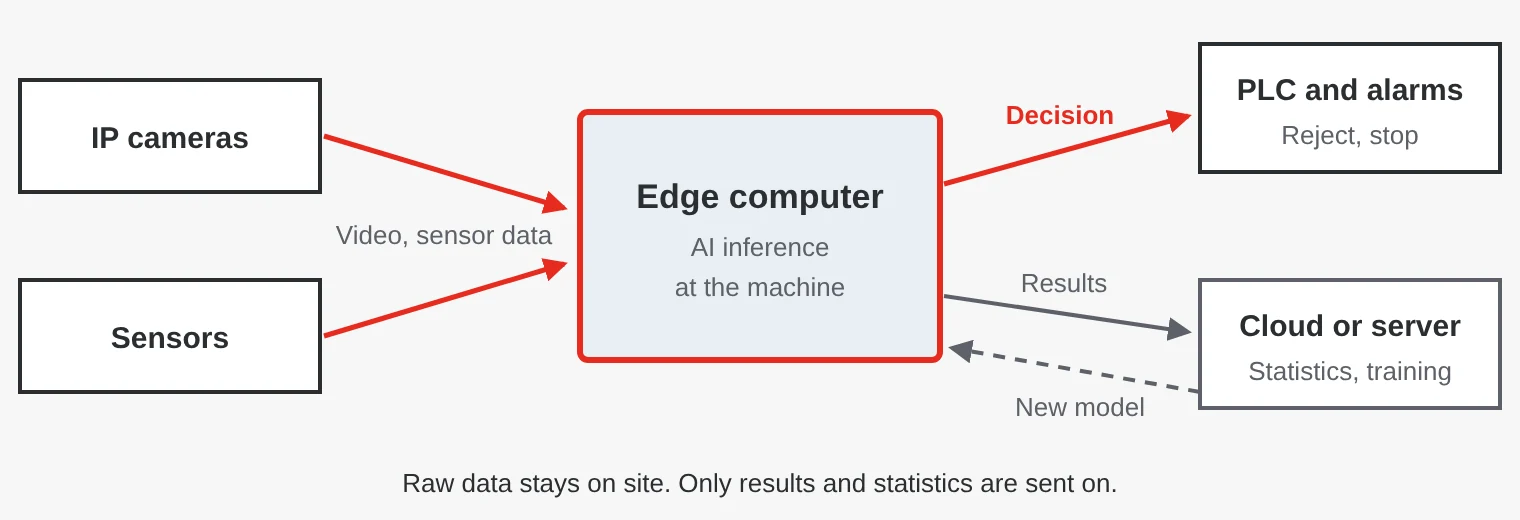
- Fast response – the decision is made at the machine, for example when a faulty product must be rejected from the conveyor.
- Less data traffic – ten cameras over 4G get expensive, but an alarm with a still image is small.
- Works offline – the system keeps running in a mine, on a ship or in a tunnel.
- Data protection – images of people and sensitive production data do not have to leave the site, which makes GDPR compliance easier.
The cloud is often still needed. The usual set-up is to train the model on a powerful server or in the cloud and run it locally.
Where is AI at the edge used?
- Factories – machine vision and quality inspection that detects scratches, missing parts and wrong labels at full line speed, even where fixed rules are not enough.
- Predictive maintenance – analysis of vibration, current and temperature that warns before a bearing fails.
- Traffic and security – counting vehicles, reading number plates and detecting intrusion at substations and tunnels.
- Vehicles, energy and healthcare – cameras around mining and forestry machines, solar park inspection and image analysis for ultrasound.
How much computing power do you need?
AI models run much faster on parallel processing units such as a GPU or an NPU (neural processing unit) than on an ordinary CPU core.
| Option | Suitable for | Keep in mind |
|---|---|---|
| CPU | Sensor data, simple models | Rarely enough for video analytics |
| Integrated GPU and NPU, e.g. Intel Core Ultra | A few cameras, object detection | Low power, Windows or Linux |
| NVIDIA Jetson | Several cameras, vehicles, robots | High performance per watt. Runs Linux, not Windows |
| AI accelerator on an M.2 or PCIe card | AI in an existing x86 computer | Check that your model is supported |
| Discrete graphics card, e.g. NVIDIA RTX | Many cameras, large models | High power, fans and a PCIe slot |
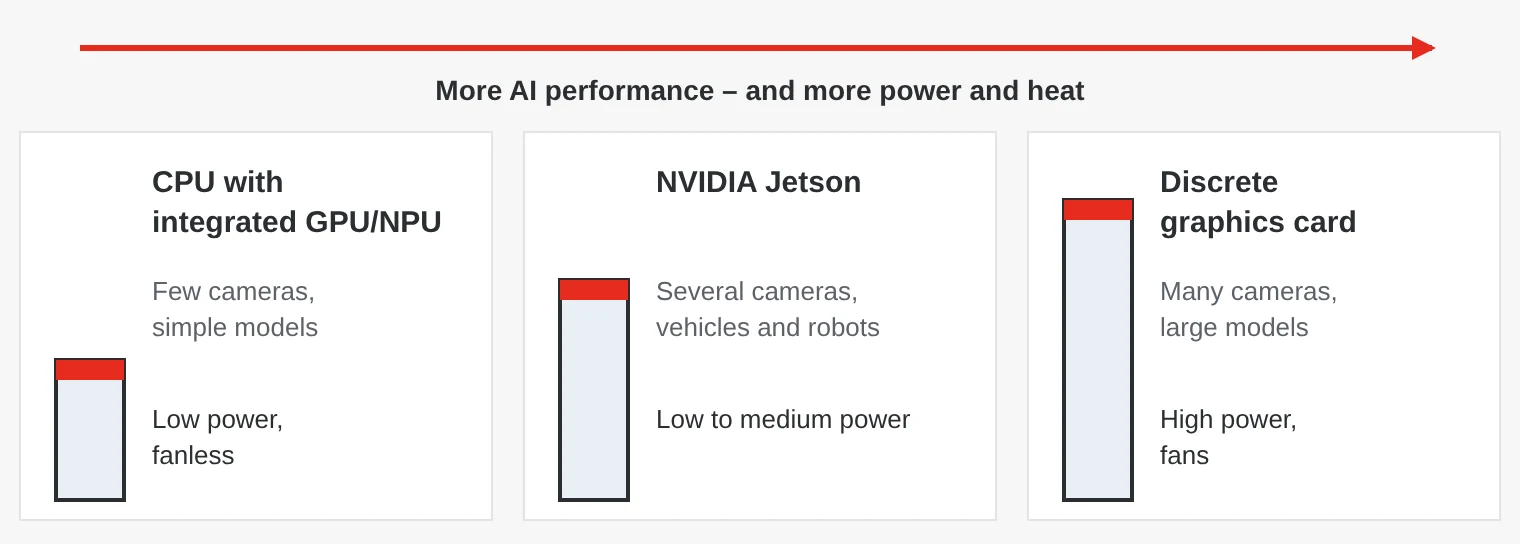
Jetson modules come in three sizes: Orin Nano, Orin NX and AGX Orin. NVIDIA quotes anything from a few tens of TOPS for Orin Nano up to 275 TOPS for the largest AGX Orin module, at roughly 7 to 60 W.
What does TOPS mean in practice?
TOPS (tera operations per second) states how many trillion simple operations the chip can perform per second, usually with 8-bit integers (INT8). It is a theoretical maximum, and vendors count differently. Some assume sparse computation (sparsity), which can double the figure, and some add CPU, GPU and NPU together.
What matters is how many frames per second your model achieves at the resolution you need, and with what latency. So test the model with your own images on a developer kit or sample unit and add a margin for more cameras.
Quantisation, converting the model from 32-bit floating point to 8-bit integers, often gives several times higher speed with little loss of accuracy. NVIDIA TensorRT and Intel OpenVINO do this for you.
Cameras, PoE and cooling
The most common choice is IP or GigE Vision cameras with PoE, where one cable carries both data and power. PoE to IEEE 802.3af supplies up to 15.4 W per port and PoE+ (802.3at) up to 30 W, but the computer’s total power budget can be lower than the sum of the ports. Vehicles and robots often use GMSL cameras with coaxial cable and FAKRA connectors, which withstand vibration.
AI calculations generate heat. A fanless Jetson computer is cooled through its chassis, while a computer with a powerful graphics card needs fans and a large power supply. At high temperatures the clock speed drops, and so does the frame rate. Test at the highest temperature the computer must handle. Fanless cooling and power input are covered in our guide to industrial PCs.
Software, remote management and lifecycle
Choose the software platform before the hardware. NVIDIA Jetson runs JetPack, NVIDIA’s software package with Jetson Linux (based on Ubuntu), CUDA and TensorRT. Computers with Intel processors often use OpenVINO and can run both Windows and Linux.
Containers, for example Docker, make it easy to swap the model without touching the operating system. With many computers in the field you need remote management for updates and monitoring. Plan security too: secure boot, TPM and a segmented network in line with IEC 62443.
AI hardware develops quickly, but a machine is sold for many years. NVIDIA states that the Jetson Orin modules are available until January 2032 and the industrial AGX Orin module until July 2033. Also ask how long your specific computer model will be supplied.
Five common mistakes
- Choosing by TOPS. The figure says little about how your model performs. Test with your own images.
- The PoE budget is too small. The cameras work on the bench but restart when the IR illumination switches on at night.
- Too few training images. New lighting, dirt and new product variants reduce accuracy. Plan for retraining.
- Using AI as a safety function. Camera-based person detection does not replace certified safety devices such as light curtains and safety laser scanners.
- No plan for updates. Without remote management someone has to visit every computer to change the model.
Edge AI computers from SCN
We supply AI computers from brands such as AAEON, Winmate, Arbor Technology and Axiomtek – from compact Jetson computers with PoE to systems with room for a full-size graphics card.
Examples from our range
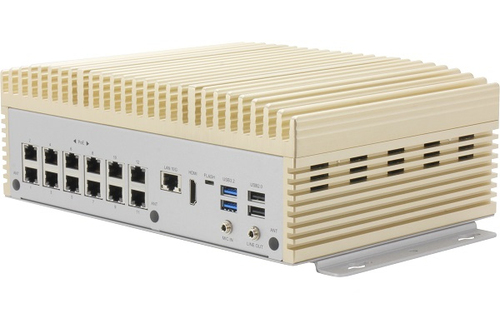 AAEONBOXER-8646AI Fanless PoE Embedded AI SystemFanless AI computer with NVIDIA Jetson AGX Orin (up to 200 TOPS) and twelve PoE ports with a 120 W total budget, for traffic and security monitoring.View product →
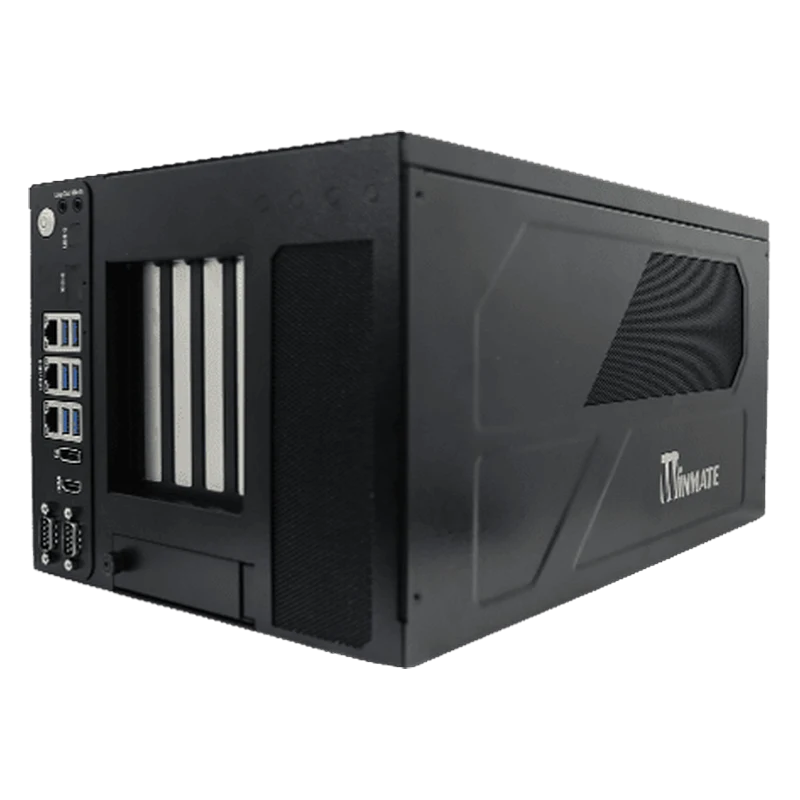 WinmateWNAI-E800L GPU-Ready Edge AI ComputerEdge AI computer for machine vision with a PCIe x16 slot for NVIDIA RTX cards and up to 96 GB of memory.View product →
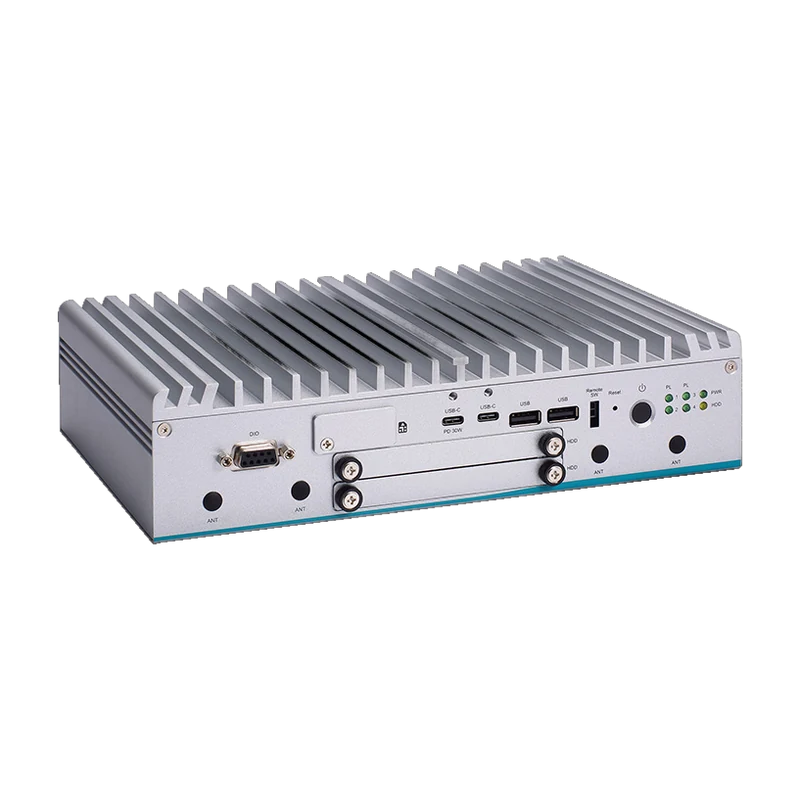 AxiomtekeBOX630B Fanless Edge AI PC with Core UltraFanless computer with Intel Core Ultra, Arc GPU and NPU for OpenVINO, 9–60 V DC and −40 to 60 °C.View product →
Erik Ahlqvist is Managing Director of SCN and has spent more than 20 years helping industrial companies choose the right electronics for demanding environments. He holds a BSc in Electronics from KTH Royal Institute of Technology, Stockholm.
LinkedIn profileFrequently asked questions
What is the difference between edge computing and the cloud?
With edge computing, data is processed locally, close to the machine. The edge gives faster response and works offline, while the cloud suits training and analysis across many sites.
How many TOPS do I need?
It depends on the model, resolution and number of cameras. Test your model on a developer kit, measure frames per second and choose a computer with some margin.
Can NVIDIA Jetson run Windows?
No. Jetson runs Linux through NVIDIA’s JetPack software package. If you need Windows, choose an x86 computer with an Intel processor, possibly with a graphics card or AI accelerator.
What is the difference between a GPU and an NPU?
A GPU is a flexible parallel processor for graphics and AI. An NPU is built only for AI calculations and gives high performance per watt, but supports fewer types of models.
More guides on Industrial Computers
All guides →Want to know which computer can handle your model and your cameras? Ask us – you will get an answer within 24 hours.
Ask us